
Automating Employee Offboarding: Simplicity Just One Click Away

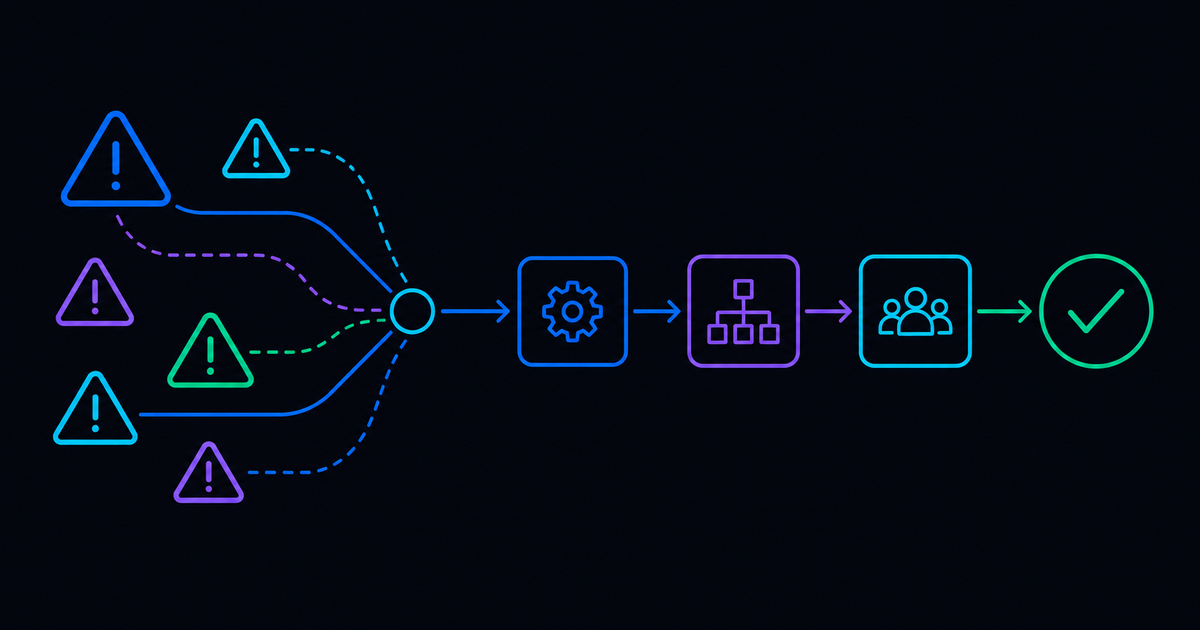

Employee offboarding looks simple from the outside. Someone gives notice, HR processes the paperwork, and IT handles the rest. In practice, "the rest" is where things get complicated. A single departure can touch dozens of systems, and the handoffs between them (between HR and IT, between tools, between teams) are exactly where access stays on longer than it should, steps get missed, and audit findings show up months later.
There's a better way to run it: one action that kicks off a sequence you can trust, without relying on memory, manual tickets, or perfect coordination to get it right.
READ MORE: Operationalize Onboarding and Offboarding with Automation
Employee Offboarding Automation: What Breaks When You Rush It?
Like employee onboarding, the many moving pieces of offboarding are beyond a headache for IT. They can actually be impossible to do manually. It’s particularly surprising for people who look at employee offboarding from the surface. There’s more involved than what meets the eye.
Coordinating between HR and IT gets the job done, but it's far from efficient. There's a lot of unnecessary back-and-forth communication and wait times, and processes that are susceptible to human error, all required to make sure offboarding is done right.
One reason this breaks at scale is that offboarding is rarely “one system, one checklist.” A single departure can touch identity, email, endpoints, SaaS, shared drives, ticketing, and whatever line-of-business apps your teams rely on. The employee offboarding process also pulls in non-IT steps that still depend on IT timing, like final pay rules, hardware return windows, and coordination with a payroll system when changes have to land on a specific day.
Why “Simple” Offboarding Turns Into Risk
Offboarding is often more complex than onboarding, even though most people assume the opposite. It can be really easy to accidentally leave a former employee's access to a system on, especially after a tenured employee gains access to multiple systems. Without a reliable record of every system an employee accessed, it's easy to miss one.
The benefits of automation translate to security in a very big way. When you miss a step, you do not just leave a door open; you leave a trail. That is how orgs end up with lingering credentials, over-scoped permissions, and inconsistent access control across tools. Those gaps are part of why offboarding mistakes show up later as audit findings, incident cleanups, and worst case, data breaches.
READ MORE: Provision Access Without Delay or Risk
Why HR and IT Need to Work From the Same Starting Point
Most teams treat offboarding as a “ticket to handle.” A more reliable approach treats it as an event with a source of truth. HR finalizes the departure, a trigger fires, and the IT workflow runs with the right guardrails. This approach also keeps you honest about timing.
If HR marks someone as active until 5 p.m. on their last day, the workflow should respect that schedule, not revoke access early if the person still needs it to wrap up.
If you want to automate employee offboarding without breaking trust, the workflow needs clear inputs, clear timing, and a clean audit trail.
The One Click That Actually Means Something
Here’s the simplest way to think about offboarding: one action should kick off a chain you can trust. You are not looking for a pile of scripts that run “most of the time.” You are looking for an end-to-end sequence that closes the loop, even when the environment is messy.
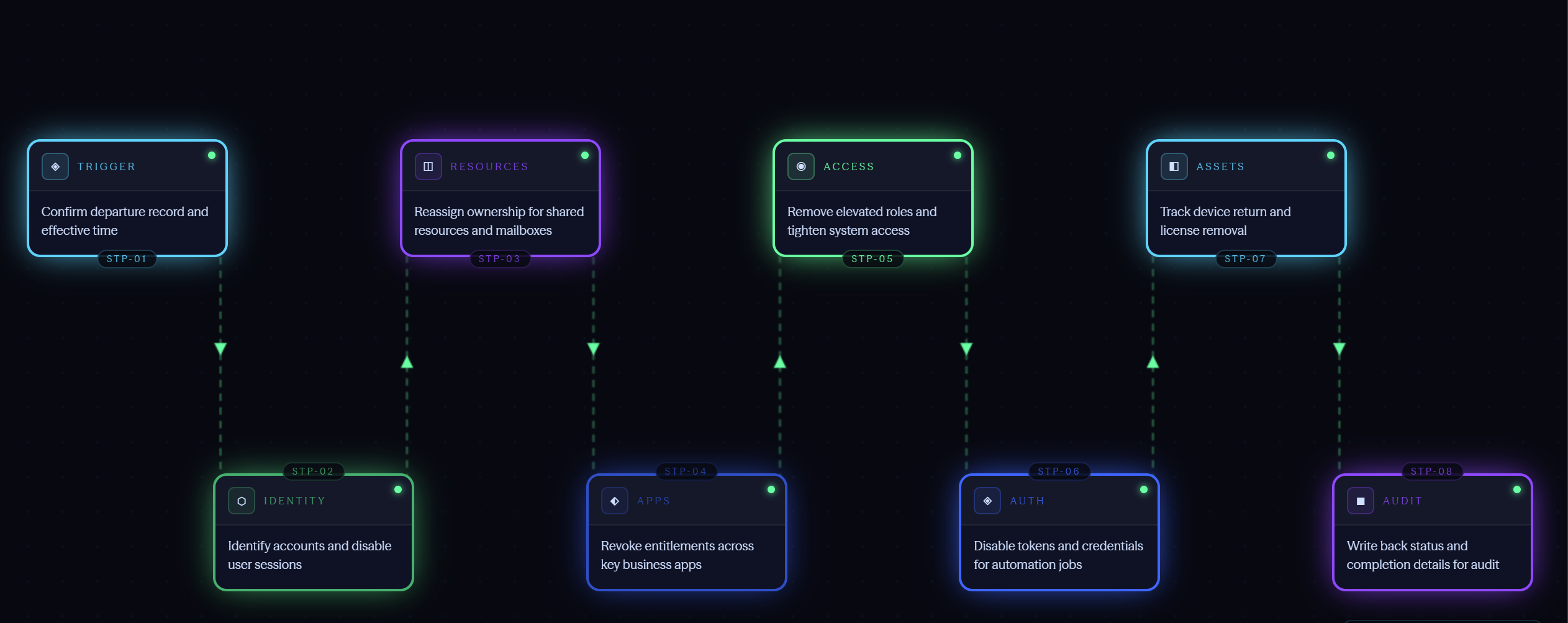
Below is a practical “minimum chain” you can use to sanity-check your current offboarding workflows. If your process stops halfway through and depends on people to remember the rest, you will keep finding surprises later.
- Confirm the departure record and effective time
- Identify accounts tied to the person and disable user sessions
- Reassign ownership for shared resources and mailboxes
- Revoke entitlements across key business apps
- Remove elevated roles and tighten system access where needed
- Disable tokens and credentials used for automation jobs
- Track device return and license removal to support asset recovery
- Write back status and completion details for audit
What Automation Looks Like for Real-world Offboarding
For IT, offboarding is not simply onboarding in reverse.
In practice, good automation means you can trigger the workflow, watch each step execute, and prove what happened after the fact. Resolve’s model leans on connected steps and detailed run history, so teams can trace actions back to the exact request, inputs, and outcomes. That traceability is exactly why offboarding automation works best as part of an integration platform that coordinates actions across identity, ITSM, endpoint tools, and security systems.
An example that comes up often is identity hygiene. A workflow can query Active Directory or your IdP, list users by group or status, then flag items that violate your criteria. If the workflow finds accounts that should not be active, a follow-on change step can run remediation and record each action for later review.
That is also where “one click” becomes more than a metaphor. The click is a controlled trigger. The work is a series of consistent steps that can revoke access automatically, produce the records an auditor will ask for, and reduce the number of late-night cleanups your team does after the fact.
READ MORE: One IT Automation Platform: Hundreds of Integrations
Request a Demo
Employee departures are emotional, operational, and time-sensitive. IT still has to do the work, even when the rest of the organization is moving fast. The goal is not to remove people from the process completely. The goal is to remove the manual steps that create gaps, delays, and inconsistent outcomes.
Request a demo to see how Resolve can streamline offboarding for your organization's HR and IT teams.to see how Resolve can streamline offboarding for your organization's HR and IT teams.
FAQ: Employee Offboarding
Why does offboarding take so long, even when it looks straightforward?
Because the work is distributed, a single departure can touch identity, endpoints, SaaS tools, shared resources, and security controls, and the handoffs between those tools are where time disappears.
What should be automated first?
Start with high-volume, high-risk steps: disabling accounts, removing elevated roles, and updating the systems that create audit findings when they drift.
How do you keep automation from revoking access too early?
Use a clear source of truth for timing and build a scheduled trigger that respects the effective time, with approvals where your policy requires them.
What makes an offboarding workflow “auditable”?
You can show what ran, when it ran, what inputs it used, what objects it changed, and what the final state is, without reconstructing the story by hand.
What gets missed most often during offboarding?
Entitlements outside the obvious systems, like one-off SaaS access, shared resource ownership, and credentials created for automation or service tasks.
What should I look for in an offboarding automation tool?
The core requirements are a reliable trigger (tied to HR's source of truth, not a manual ticket), coverage across identity, endpoint, and SaaS systems, and a complete audit trail. A good offboarding automation tool should close the loop end-to-end, not just handle account deactivation. See how Resolve's offboarding automation software covers each of these.
.png)
.png)