What Is Real-Time Agent Assist, and How Does It Cut Escalation Time?

At a Glance
- Real-time agent assist supports the technician handling an escalated ticket, rather than the employee asking for help.
- It reduces the discovery work that often consumes the first 15–30 minutes of an L2 or L3 escalation.
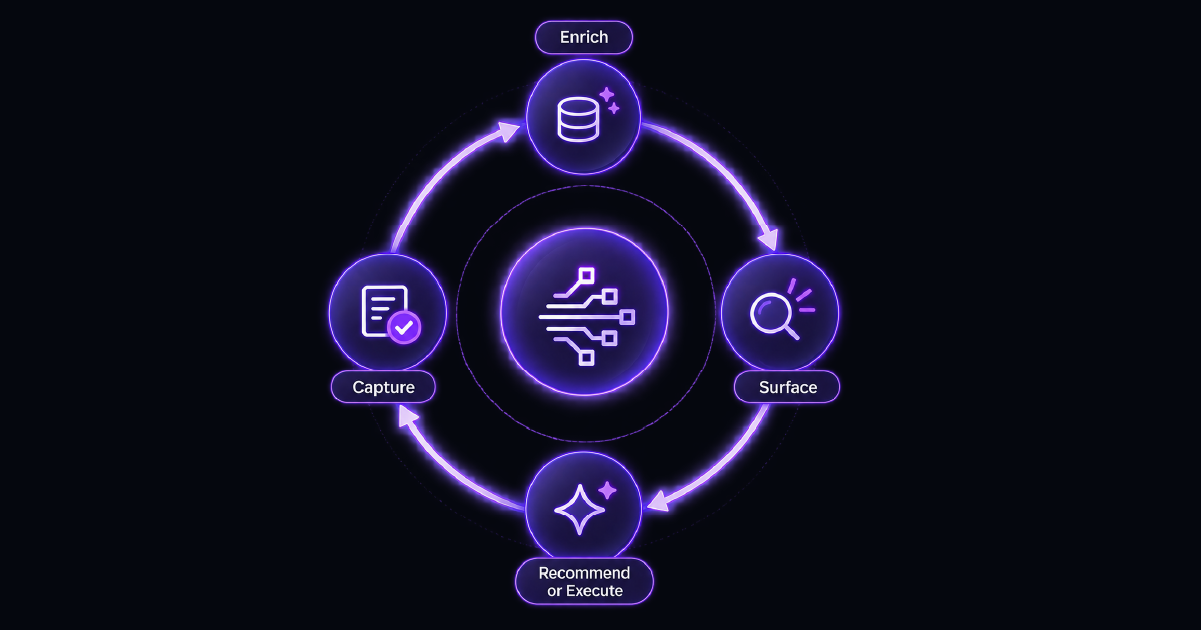
- The core loop enriches the ticket, surfaces past resolutions, recommends or executes the next action, and captures the outcome.
- “Real-time” means the relevant context appears in seconds when the ticket opens; it is not a millisecond-level systems claim.
- Useful recommendations are grounded in the organization’s resolved tickets, CMDB data, runbooks, diagnostics, and governed automations.
When a ticket reaches an experienced technician, the issue is supposed to be closer to resolution. Too often, the escalation starts the investigation again.
The technician reads the history, checks what L1 attempted, opens the CMDB, searches past incidents, and pulls logs. The fix itself may take two minutes, but reconstructing the situation can take far longer.
Real-time agent assist targets that gap. It gives technicians a better starting point by assembling context and action options inside the ticket before troubleshooting begins.
What Is Real-Time Agent Assist?
Real-time agent assist is an AI copilot category for service desk technicians. It enriches a ticket, retrieves past resolutions and runbooks, recommends a next step, and can connect that recommendation to approved automation.
The defining experience is all about in-workflow delivery. The technician does not open another chat window, restate the problem, or search a separate portal. Context appears in the ITSM ticket where work is already happening for the analyst.
This differs from customer-facing agent assist, where a contact-center copilot may help answer a customer or summarize a conversation. Service desk agent assist helps an L2 or L3 technician resolve an escalated technical issue.
When the ticket opens, the groundwork is already done. The technician can validate the evidence and act instead of spending more of their time having to collect it manually.
Why Escalations Consume So Much Resolution Time
Resolve identifies a common pattern: L2 and L3 technicians spend the first 15–30 minutes reading ticket history, checking CMDB data, communicating with the ticket submitters, and reconstructing what L1 tried. Each handoff can reset the team’s understanding, all while additional tickets are stacking up.
Resolve’s guide to last-mile automation describes the time lost when technicians must manually gather diagnostic data, assign priority, and escalate tickets. Troubleshooting depends on observations, telemetry, logs, system knowledge, and a clear record of what has already been tried. Missing inputs delay the technician before diagnosis even begins.
The evidence often exists but is fragmented across ITSM notes, device and identity systems, CMDB relationships, diagnostics, resolved incidents, and runbooks.
Resolve’s guide to IT help desk automation explores this ticket-quality problem. A technician-ready ticket should arrive as a decision-ready case, not loose symptoms.
Context can be the difference between a two-minute fix and a two-hour war room. Real-time agent assist shortens the path to the point where human expertise becomes valuable.
Measure escalation in two parts: time to usable context and time from context to verified resolution. A tool can shorten the first without improving the second. Tracking both shows whether agent assist removes discovery work and whether its recommendations help technicians resolve the issue.
The Four-Step Loop Behind Real-Time Agent Assist
Real-time agent assist works as a repeatable loop, not a one-time summary.
Step 1: Enrich the Ticket
The loop adds device information, user identity, related configuration items, changes, and diagnostics. Resolve’s ITSM automation solution shows how ticket context can be validated against CMDB data, identity information, and organizational policies before action begins. CMDB context should expose the dependencies surrounding an affected service, not simply provide a flat asset list.
Enrichment should preserve provenance: where a value came from, when it was collected, and whether the source is trustworthy.
Step 2: Surface Past Resolutions
The system searches incidents and runbooks for similar symptoms, environments, and outcomes. The result reflects what worked inside the organization’s stack.
Resolve’s Knowledge Agent connects knowledge articles, runbooks, policies, and resolved tickets so relevant organizational knowledge can be retrieved and reused. Agent assist applies that principle at ticket speed by searching early, preserving context, and turning successful resolutions into better support for future incidents. This also creates a path for future automations built around these repeatable scenarios.
Similarity should use more than matching words. Service, device type, recent change, failure signature, prior diagnostics, and resolution outcome can determine whether an old incident is genuinely applicable. The technician should be able to inspect the source before accepting the recommendation.
Step 3: Recommend or Execute the Next Action
The recommendation may be a diagnostic check, runbook step, escalation path, or approved automation. A matching workflow can run from the ticket instead of another tool.
Resolve’s guide to agentic AI governance identifies the controls required when AI can recommend or execute actions across enterprise systems. These include permission limits, trusted context sources, human approval gates, action restrictions, rollback logic, observability, and audit trails. One-click execution should mean one governed click, with authorization, logging, and verification attached.
Step 4: Capture the Outcome
The loop records the action, result, technician changes, and missing knowledge. Successful resolutions become reusable; failed recommendations become improvement evidence.
Operational learning becomes valuable when teams turn outcomes into shared, reusable knowledge instead of letting them disappear after recovery. The captured result should show what the system recommended, what the technician changed, whether the action worked, and what should improve before the next similar escalation.
What “Real-Time” Actually Means
Here, “real-time” describes delivery speed and workflow placement. Context appears when the ticket opens or escalates, with discovery compressed into seconds. It does not claim streaming, hard real-time guarantees, or millisecond deadlines.
Live diagnostics pull current logs, health checks, and system state into the ticket on demand. They avoid a remote session but do not imply continuous background monitoring.
Test the claim by escalating a realistic ticket and timing how long identity, device, relationships, diagnostics, incidents, and a next action take to appear. Verify what was precomputed versus queried on demand.
How Agent Assist Differs From a Generic AI Copilot
A generic copilot can summarize ticket text or suggest steps from broad model knowledge. Real-time agent assist grounds its response in your organization’s resolved tickets, CMDB data, approved runbooks, diagnostics, and automations.
Grounding does not guarantee correctness, so buyers should expect visible sources, permission enforcement, feedback controls, and clear ways for technicians to reject or correct recommendations. Production behavior should remain observable as the system learns, and ambiguous or high-risk issues should continue to defer to human judgment.
Execution is another dividing line. A chat suggestion leaves the technician to run the command and update the ticket. Agent assist connects a recommendation to a governed workflow, creating a system that gets smarter the more it is used.
“Self-learning” should mean accepted resolutions, failed actions, corrections, and knowledge gaps improve retrieval and deterministic workflow coverage. It should not mean production behavior changes invisibly.
Evaluate the system with a known repeat incident, a similar-but-different incident, and a novel issue. That mix reveals whether the copilot retrieves evidence carefully, distinguishes exceptions, and defers to human judgment when the organization has no proven resolution path.
How Resolve Agent Assist Cuts Escalation Time
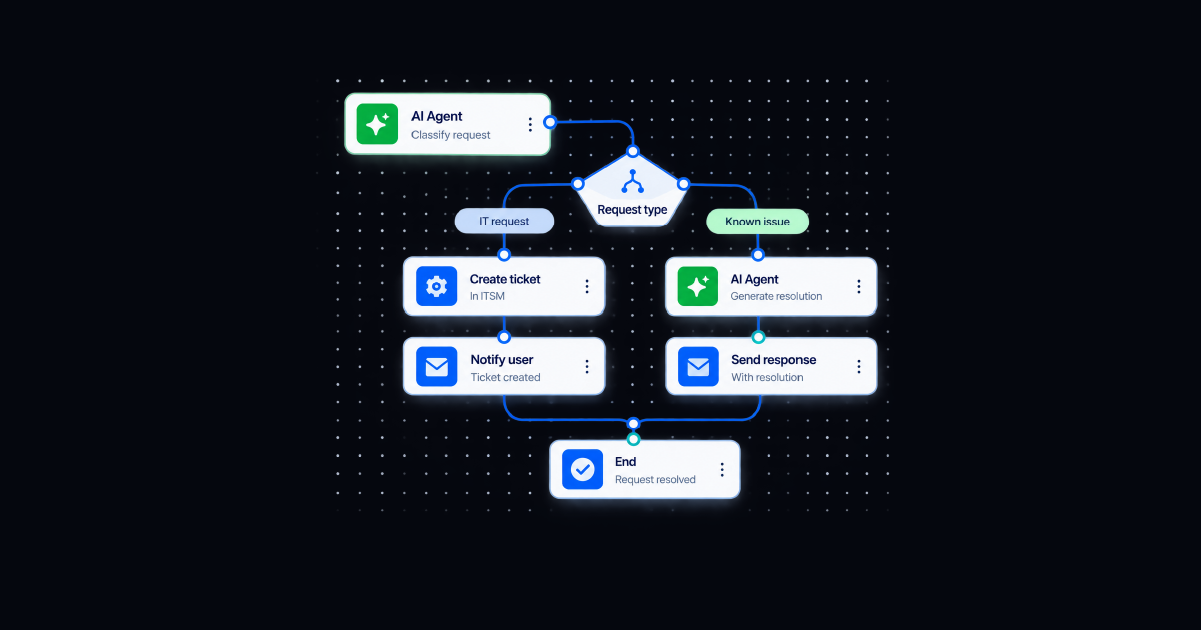
Resolve Agent Assist runs this four-step loop inside any deployed ITSM. It enriches tickets with device, identity, CMDB, and diagnostic context; searches past incidents and runbooks; recommends the next action; connects approved recommendations to one-click automation; and captures the outcome.
Resolve reports a 60%+ reduction in L2/L3 escalation handling time and 99% faster MTTR on repeat incidents. These are proven product outcomes, not universal benchmarks, but they identify the right measures: discovery time removed, repeat-incident resolution speed, recommendation acceptance, successful automation, and escalation outcomes.
Agent Assist is part of Resolve’s Agentic Resolution Fabric. Knowledge Agent retrieves grounded information, Automation Agent executes governed workflows, and Agent Assist supports the escalation path where human judgment is still required.
That division is important. This separation allows routine work to resolve autonomously, while novel, risky, or ambiguous issues still reach a technician. Now, they arrive with evidence, prior experience, and an actionable head start.
Give Technicians a Head Start on Every Escalation
Real-time agent assist is defined by what happens when a ticket reaches a technician. The ticket is enriched, relevant past resolutions are visible, the next action is ready, and the outcome feeds future work.
The most useful metric is how much of the 15–30 minute discovery window disappeared before the technician began fixing the issue.
Resolve Agent Assist gives technicians a head start on every escalated ticket.
Frequently Asked Questions
What is real-time agent assist?
Real-time agent assist is an AI copilot for service desk technicians that enriches tickets with context, surfaces similar resolutions and runbooks, recommends next actions, and connects approved actions to governed automation inside the technician’s ITSM workflow.
What does “real-time” mean in agent assist?
It means ticket context and recommendations appear in seconds when a ticket is created, opened, or escalated. It does not imply continuous background monitoring or hard real-time, millisecond-level system guarantees.
How is agent assist different from a chatbot?
A chatbot usually interacts with the employee requesting help. Technician agent assist works inside an escalated ticket, using organizational data and resolution history to support the human technician diagnosing and resolving the issue.
How should teams measure real-time agent assist?
Track time spent gathering context, L2/L3 handling time, MTTR for repeat incidents, recommendation acceptance, automation success, escalation rate, resolution verification, knowledge gaps, and the percentage of outcomes captured for reuse.